Nobody starts a business to write thank-you notes to strangers. But every Google review reply is public, Google says replies show you're responsive, and a two-star review sitting unanswered says more about you than the review does.
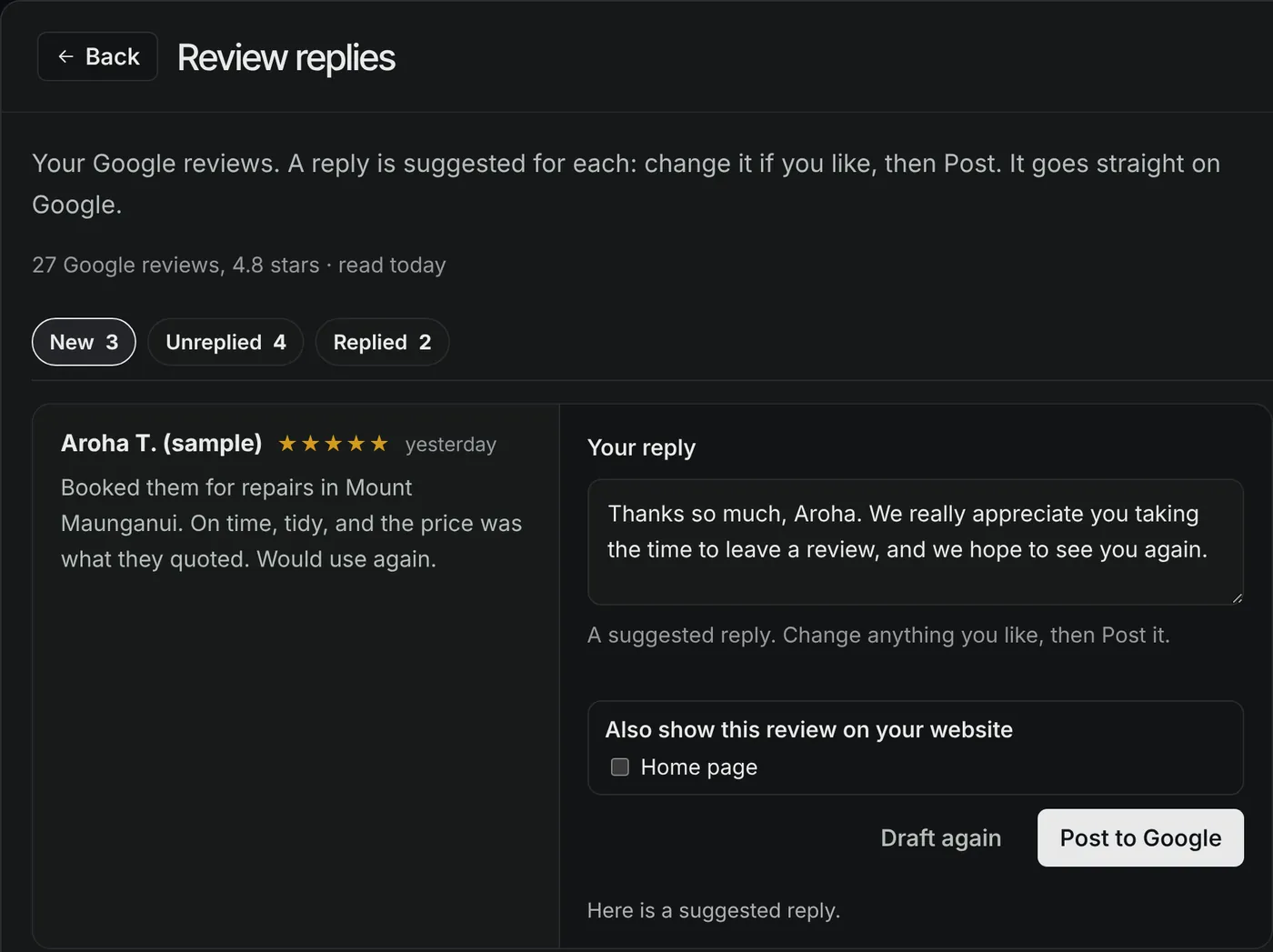
So we took the blank box out of the job. On our client dashboards, every new Google review turns up with a reply already written. The owner reads it, tweaks it if they want, and posts it to Google in one press.
How it works
Each morning the dashboard reads new reviews from the business's Google Business Profile. Every review shows up with a reply already drafted, written from the review itself and the business's name, trade and town.
The owner can keep the draft, rewrite it or clear it and start again. When they press Post, the reply goes to Google, and the dashboard only marks it done once Google accepts it. They can also tick the pages of their website where the review should appear, and it goes up in the same step.
For a 1, 2 or 3 star review the draft is short: thanks for the feedback, sorry it fell short, please call so you can talk it through. That review is flagged so the owner sees it first.
Six rules the AI can't talk its way around
Asking an AI nicely isn't a guarantee, so every draft is checked against these rules after it's written. If it breaks one, it's discarded rather than patched up.
- Two or three sentences, 500 characters at most.
- The reviewer's first name only. The AI is never shown the rest of their name, and a draft that uses it anyway is dropped.
- No money, prices, discounts, "free", vouchers, offers, refunds or deals.
- Never calls the reviewer a client, customer or patient.
- No web addresses or email addresses, and no phone number except the business's own.
- A 1 to 3 star review must invite them to call or get in touch.
It's also told not to repeat the review back, not to open with stock lines like "Thank you for your kind words", and to vary its wording, because every reply sits on the same public page. Those are style instructions rather than hard checks, which is one more reason a person reads every draft.
Why those rules
Most of them follow Google's own advice on replying. Google suggests keeping replies brief, not using them to offer deals or promotions, never sharing a reviewer's private information, and asking someone to contact you privately when an issue is complicated. Replies are public, the reviewer is notified, and Google checks each reply against its content policies before it shows.
The client, customer or patient rule is ours. For a physio or a lawyer, a reply that says "thanks for being a patient" tells the world something the reviewer may not have meant to share.
Try the rule checker
This runs the same checks the dashboard runs on a draft, here in your browser. It doesn't write a reply, and what you type isn't sent anywhere. Paste a reply you'd post and it tells you whether it would pass.
Try adding a surname, a price, "free", a web address or "our customer" and check again. Then try a 2 star review without asking them to get in touch.
What it won't do
- It doesn't know your job records. It drafts from the words in the review, so details about the job come from you.
- It covers Google reviews only. Facebook and other platforms aren't connected.
- Posting straight to Google needs the business's verified Business Profile, with PlainBlack added as a manager. Until that's set up, the reply is approved on the dashboard and posted by hand.
- There's a daily limit on drafts. Past it, the box is empty and you write the reply yourself.
- It doesn't decide anything. You're the one posting, so you're the one who reads it first.
Where it fits
It's one mod on the dashboard our clients use to work with us. The rest of the AI on the dashboard is on our tools page.
Sources
- Google Business Profile Help, Manage customer reviews. Checked 15 October 2026.
- Google Business Profile Help, Tips to get more reviews. Checked 15 October 2026.